Expected Outcomes:
After completing this article, you should be able to identify and understand the meaning of each appointment status within the CTA platform.
Purpose/Short Description:
This article provides a quick guide to help you find and understand the key for all appointment statuses in the CTA scheduling system.
Tags:
CTA, appointments, Counselor, Provider, Clinician, Scheduling, Appointment Status
Audience:
Counseling team, Providers/Clinicians
Step-by-Step Instructions
-
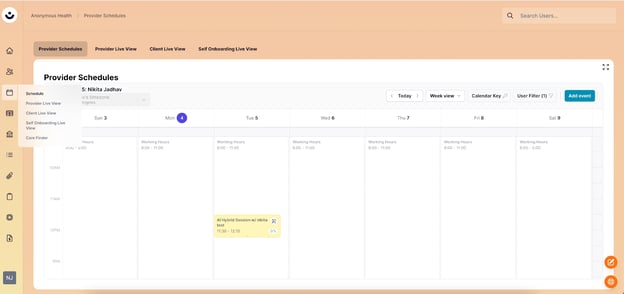
Navigate to the Schedule: In the CTA platform, click the calendar icon on the left-hand side to go to your Schedule.
-
Open the Calendar Key: Click the "Calendar Key" button on the right side of the screen. A window will pop up with a list of all appointment statuses and their descriptions.
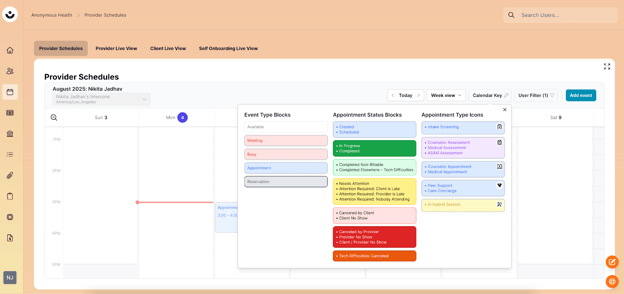
Appointment Status Definitions
-
Created: An appointment has been scheduled and is awaiting the next action.
-
Scheduled: An appointment is confirmed and waiting for the designated date and time to begin.
-
In Progress: The appointment has started and is currently underway.
-
Completed: The appointment was successfully finished as scheduled.
-
Completed Non-Billable: The appointment was finished but will not be charged to a client or insurance.
-
Completed Elsewhere - Tech Difficulties: The session was finished but had to be completed on an alternative platform due to technical issues.
-
Needs Attention: The appointment requires a follow-up or a specific action from a staff member.
-
Attention Required: Client is Late: The client has not joined the session, and the start time has passed.
-
Attention Required: Provider is Late: The provider has not joined the session, and the start time has passed.
-
Attention Required: Nobody Attending: The start time has passed, but neither the client nor the provider has joined the session.
-
Canceled by Client: The client proactively canceled the appointment before it began.
-
Client No Show: The client did not attend a scheduled appointment and did not cancel beforehand.
-
Canceled by Provider: The provider proactively canceled the appointment before it began.
-
Provider No Show: The provider did not attend a scheduled appointment and did not cancel beforehand.
-
Client/Provider No Show: Neither the client nor the provider attended the scheduled appointment.
-
Tech Difficulties: Canceled: The appointment was canceled specifically due to unresolved technical problems.